Posts

Showing posts with the label Google Maps

New Weather Apps - Sep'20 (Week - 01)
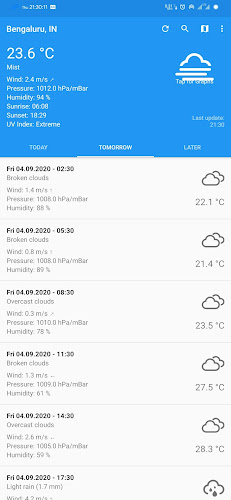
Image
This week we have brought brand new weather apps worth trying. 1.  CliMate Released date: 25Jul2020 Downloads:  50+ Size: 2.37 MB Version: 1.15.2  Climate is surely a new entrant to the play store but not just another basic weather app since it offers all the features of a weather app without any ads and in-app purchases with a clean and simlple UI along with loads of customization options. Features: Themes support. Complete weather report for a week. Customizable units Parameters such as temperature, wind speed, Humidity, Pressure, UV Index available. Sunrise and Sunset. Widget support. Graphical representation of the data. Mostly shows accurate data.
Google Maps gets Speedometer feature

Image
In a recent update, Google has rolled out a new feature Speedometer  into the Maps app. Google Maps To enable the feature, use the below path. Maps > Hamburger Menu > Settings > Navigation Settings > Driving Options > Speedometer Now, the maps will show the speed at which vehicle is being driven while in navigation mode. Speed metrics are shown automatically based on the location. If you wish to change the metrics use below path . Maps > Hamburger Menu > Settings > Navigation Settings > Map Display > Distance Units The speed shown on the maps is almost the same as the actual digital speedometer of a vehicle, in fact, the difference was just 2-3 kilometers as we have tested this out. Speedometer - Google Maps What are the uses of this speedometer? Obviously, know how fast are you moving along with the navigation. Get notified when exceeding speed limits. This is may come in the feature, sounds interesting: Get a weekly ...

Google Maps gets commute feature and integrates popular music services

Image
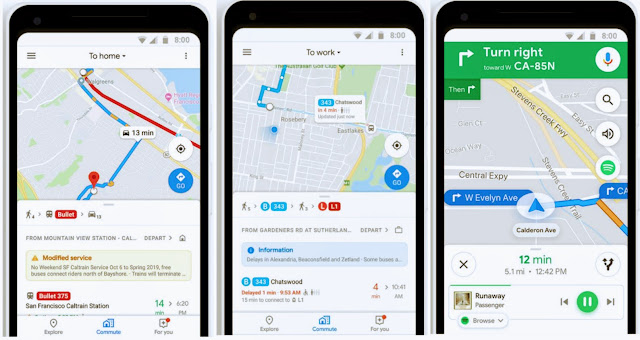
Google Maps is the must-have app for every smartphone user, it has many useful features such as turn-by-navigations, nearby, traffic info and etc. Now Google has announced a brand new feature which includes few commuting features and integration of Spotify, Google Play Music, and Apple Music with the Maps. Source: Google Most of the users prefer to listen to the music or podcast while using the navigation, hence music services such as Spotify, Google Play Music, and Apple Music got integrated into the Maps and can be used within the Maps without leaving the app. Next feature is the "Mixed-Mode" is quite useful for the people who drive to a subway, Bus or Train station and use the public transportation to reach the workplace. With this feature, users get the real-time updates such as ' Time to reach the Bus or Train station ' and updated public transport details (next bus or train info, any delay in the scheduled time) as soon as the journey starts. All thi...

Google Maps - New Update (Version 9.70.0)

Image
This new update brings few visual changes and three categories to the maps experience. Search Nearby: Right after opening the app you'll get to see a search nearby panel with separate tiles for Restaurants, Cafes, Gas stations, ATMs, Pharmacies, and Groceries which will help nearby places without any typing. Just below the tiles photos of the popular places nearby which will give first glance about the places and surroundings. This option can be enabled by tapping the Explore tab at the bottom. Search Nearby Driving or Driving Mode: This driving feature proposes faster routes to home or office along with traffic updates in that particular area. Android Auto has been integrated for Drive smarter. Finally there a tile which provides information about rides or trips (trip details along with distance traveled). Driving Transport: This tab shows you the relevant public transport details based on the home and office details and nearby station information as well. ...